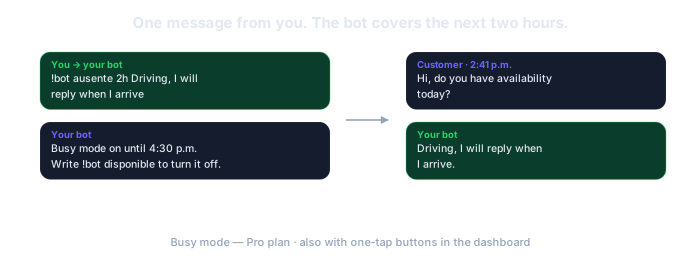
Every message you miss while you work is a job that goes to the next name on the list. ResumiBot holds the line: you write !bot ausente 3h On a job, I will reply at 3 and everyone who messages gets that line; the menu answers prices and service areas on its own; and when you flag a quote, follow-up alerts you if the customer goes quiet.
No card. The free plan is permanent: 5 groups and 50 AI calls a month.
Under a sink, up a ladder, inside a panel. The phone buzzes and you cannot touch it. The customer only sees silence.
"Do you come to my area? How much is a service call?" The two questions every new customer asks. The menu answers them while you finish the job in front of you.
You sent the price. They said "let me check". Nobody wrote again. Follow-up alerts you before they call someone else.
!bot ausente 3h On a job, I will reply at 3. Everyone who writes in those three hours gets that line, once each. !bot disponible if you finish early.
"1) Services and prices 2) Areas I cover 3) Request a service call." Option 3 hands the chat to you: the bot pauses there and alerts you.
Flag the customer who said "let me check" with !bot seguimiento and the bot alerts you if 24 hours pass with no reply. You write back first.
The dashboard is in Spanish for now (your browser can translate it, but it is Spanish). The bot itself writes in the language you choose under "Voz del Bot" (bot voice), so your summaries arrive in English. We would rather tell you here than after you sign up.
Your phone can be in the truck, in your pocket or out of signal: the bot keeps answering from its own number. Switch busy mode on with a message, or from the dashboard with one tap: driving (1h), in a meeting (2h), traveling (1d). It does not detect that you are driving or working; you tell it, in two seconds.
ResumiBot connects to WhatsApp through an unofficial channel. WhatsApp can permanently block a number it detects as automated, so never connect your personal number. A cheap prepaid SIM, an eSIM or an old phone with its own line works fine.
Do not connect the number on your van or your business card. If it gets blocked, you lose it. A new number, dedicated to the bot, that you give customers from now on.
If that number ever gets blocked, you lose that number and nothing else: your account, your groups and everything the bot produced stay here.
How to get a number for the botBusy mode, the menu and follow-up are on the Pro plan ($19/month). The free plan summarizes groups; it does not serve customers.
How !bot ausente works, the times it accepts and the one-tap buttons. Pro plan.
Templates, "talk to a person" and the simulator to test it before a customer sees it. Pro plan.
You flag a contact and the bot alerts you if the hours you set pass with no reply. Pro plan.
No. You tell it, with a message or a tap. In exchange, it does not depend on your phone being on or online.
Once per contact, with a cooldown you can configure. Someone who writes three times reads your line once.
A separate number for the bot: a cheap prepaid SIM, an eSIM or an old phone with its own line. Your personal number never connects to the bot.
The free plan is permanent and asks for no card. If it is not for you, you just stop.
Try it freeAsk us on WhatsApp · A person answers, not a bot.