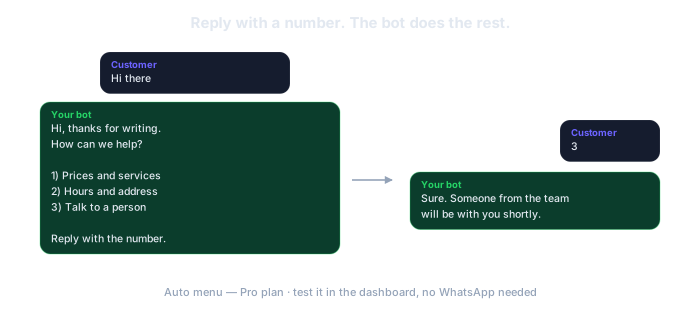
Half of what lands in your WhatsApp is the same three questions. ResumiBot greets whoever writes with a numbered menu, answers the option they pick and, when they choose talk to a person, pauses and hands the chat to you. You build it and test it in the dashboard before a single customer sees it.
No card. The free plan is permanent: 5 groups and 50 AI calls a month.
"How much is it?" "What time do you close?" "Where are you?" You have typed those answers hundreds of times. From now on the menu types them.
A customer who asks for a price and hears nothing for an hour is a customer buying somewhere else. The menu answers in seconds, at any hour.
You have seen chatbots that trap people in loops. This one is numbers: pick one, get the answer, press 0 to go back. Nothing to figure out.
Start from a ready-made template for a business, a restaurant, a clinic or a shop, with one click. Up to 9 options, each with its own answer. An option can open a submenu or hand the chat to a person.
Type as if you were a customer and see exactly what the bot replies, without touching WhatsApp or spending a thing. Switch it on when it reads right.
The first time a contact writes (the default), when they type a keyword like "menu" or "hi", or every time someone writes with no menu open. It expires on its own after 30 minutes.
The dashboard is in Spanish for now (your browser can translate it, but it is Spanish). The bot itself writes in the language you choose under "Voz del Bot" (bot voice), so your summaries arrive in English. We would rather tell you here than after you sign up.
When a customer picks that option, the bot goes quiet in that chat and sends you an alert on WhatsApp. Nobody who asked for you is left talking to a machine. And if someone types words instead of a number, the bot explains once how to answer and then stays silent, so it never ends up arguing with a customer.
ResumiBot connects to WhatsApp through an unofficial channel. WhatsApp can permanently block a number it detects as automated, so never connect your personal number. A cheap prepaid SIM, an eSIM or an old phone with its own line works fine.
Do not connect the number you give your customers. If it gets blocked, you lose your client list. A new number, dedicated to the bot, that you serve from going forward.
If that number ever gets blocked, you lose that number and nothing else: your account, your groups and everything the bot produced stay here.
How to get a number for the botThe automatic menu is on the Pro plan ($19/month). The free plan summarizes groups; it does not serve customers.
Welcome, hours, away message, busy mode, keyword replies and more: the map of everything the bot can answer for you. Pro plan.
One message to the bot and everyone who writes in the next two hours gets your "I will get back to you". Pro plan.
When nine options are not enough: the AI replies with your prices, hours and policies. Deluxe plan.
Not unless you want it to. By default it only works in one-on-one chats, so it never floods a group. You can extend it to groups from the dashboard.
The bot answers once, telling them to reply with the number of an option or 0 to see the menu. Then it stays quiet instead of repeating itself. Typing 0 always brings the main menu back.
No. The number you verified your account with never gets the menu. To see what customers see, use the simulator in the dashboard.
The free plan is permanent and asks for no card. If it is not for you, you just stop.
Try it freeAsk us on WhatsApp · A person answers, not a bot.